MUA Retouch Panel
Makeup retouching, elevated.

by Timea Buknicz
May 21, 2026 | 10 min read
Built for beauty professionals
While the Beauty Retouch Panel focuses on the broader professional retouching workflow, the MUA Retouch Panel was designed specifically for beauty and makeup retouching — helping creatives work faster, more consistently, and with greater control over beauty-focused details.
Created by beauty industry professionals, the panel is built around the logic of real makeup application and colour correction techniques, making it intuitive not only for retouchers, but also for photographers and makeup artists who retouch their own work.
Whether you are correcting skin tones, refining makeup colours, enhancing lashes and brows, adjusting facial volume, or preparing campaign-level beauty images, the panel helps streamline complex beauty-retouching processes into a cleaner and more organised workflow.
The MUA Retouch Panel can absolutely be used on its own, as it includes essential retouching tools and beauty-focused workflows. But when combined with the Beauty Retouch Panel, it creates a much more complete and powerful beauty retouching system — especially for high-end beauty, editorial, cosmetic, and fashion work.
Developed with insights from Julia Kuzmenko McKim and Jordan Liberty, the panel was created to bridge the gap between professional makeup artistry and advanced Photoshop retouching
 BACK
BACK WORK SMART, NOT HARD
Created by beauty industry professionals for high-end, campaign-quality beauty and makeup retouching workflows.
Designed to replicate the logic of real makeup application and colour correction, making the tools intuitive and easy to work with.
Quick and simple installation through the Adobe Creative Cloud app — ready to use in under a minute.
Includes a FREE self-paced Photoshop Essentials for Beauty Retouching course for beginners, along with detailed video tutorials covering every function of the panel.
Also includes custom digital makeup palettes, plus professional lash & brow brushes.
Your Digital Makeup Retouching Toolkit
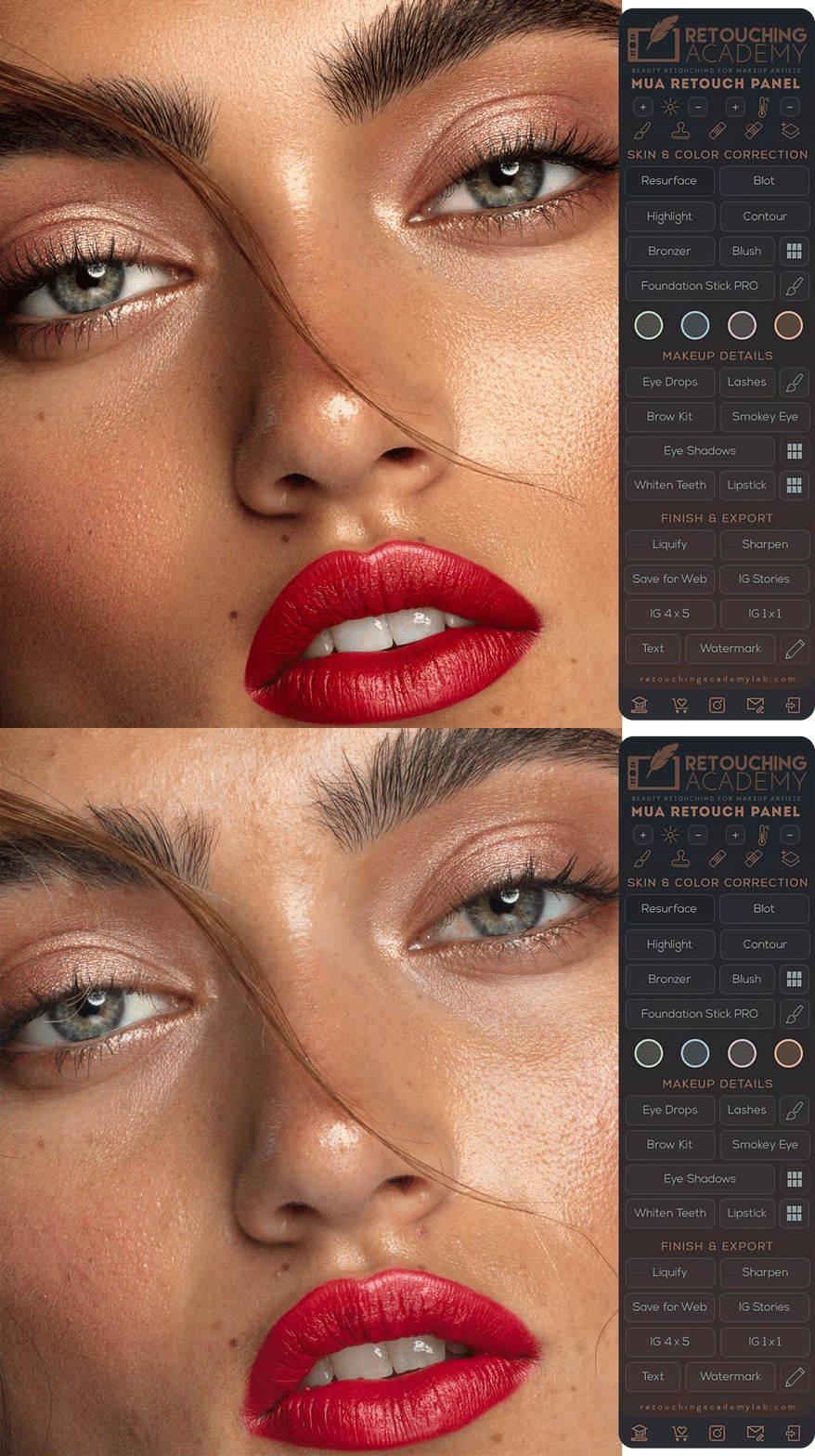
Each section of the panel is designed to support a specific stage of the beauty retouching workflow, helping you work faster while keeping your process clean and consistent.
The top section gives quick access to essential exposure and colour correction tools, alongside the core retouching functions used throughout the workflow.
The Skin & Colour Correction tools help smooth and refine skin texture, balance skin tones, and shape facial features with greater control and efficiency.
Includes custom digital makeup palettes for blush, lipstick, eyeshadows, and orange colour correction workflows.
The Makeup Details section focuses on the finishing touches — helping you quickly refine eyes, teeth, makeup, brows, and lashes with realistic precision using the included custom lash brushes.
Easily add your personal watermark or custom text directly onto your images with a single click.
The Finish & Export section simplifies the final stages of post-production, allowing you to sharpen, resize, crop, reshape, and export your images in the correct format for websites, portfolios, and social media.
The bottom-row buttons provide direct access to detailed tutorial pages and workflow guidance, helping you learn each part of the retouching process step by step.
Verified Retoucher Database
We are building a global, skill-verified retoucher database.
A platform where professional standards are documented, structured and transparent.
Skill-verified means professional standards are demonstrated, not claimed.Assessment is category-specific and based on structured test retouching.
Results are measured, scored and displayed transparently on each professional profile.
Secure early access and priority review ahead of public launch.